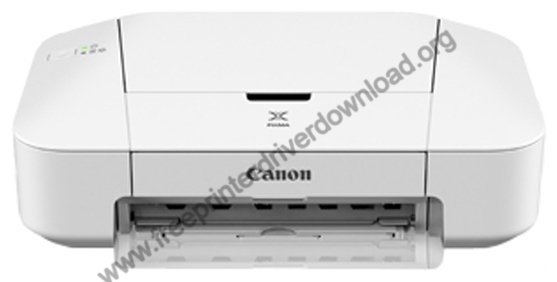

Canon PIXMA iP2840 is a basic inkjet printer but it still devlivers a very good print quality. If you are going to install or re-install the Canon PIXMA iP2840 printer, always opt for the latest version driver.
Although, you can get the latest version driver from their official wesbite but sometime to get the drivers from the official website might be bit difficult, therefore I am going to share the latest version driver download links and a step-by-step guide to install this printer on a Windows computer so that you will get an idea how to install it on a computer. Let’s start the installation process by downloading the new version printer driver from below.
Download Canon PIXMA iP2840 Printer Driver
- Locate your OS version.
- Click on its download button.
Canon PIXMA iP2840 Printer Driver for Windows
Full feature driver for Windows XP, Vista, 7, 8, 8.1, 10 (32, 64-bit)
Download (32, 64-bit)
File Name: win-ip2800-1_1-mcd.exe
Size: 47.2 MB
Version: 1.1
Type: Full feature driver
Language: All Language
Driver Pack Contains: Printer driver & software
————————————————————
Basic printer driver for Windows XP, Vista, 7, 8, 8.1, 10, 11(32, 64-bit)
Download (32, 64-bit)
File Name: pd68-win-ip2800-2_75-ea33_3.exe
Size: 12.2 MB
Version: 2.75
Type: Basic driver
Language: All Language
Driver Pack Contains: Printer driver
————————————————————
XPS printer driver for Windows Vista, 7, 8, 8.1, 10, 11(32, 64-bit)
Download (32, 64-bit)
File Name: xp68-win-ip2800-5_75-ea33_3.exe
Size: 17.9 MB
Version: 5.75
Type: XPS driver
Language: All Language
Driver Pack Contains: Printer driver
————————————————————
Full feature driver for Windows Server 2003 to 2025 (32, 64-bit)
Download
Driver for Mac
Full feature driver for macOS 10.6 to 10.12
Download
File Name: mac-ip2800-1_3-mcd.dmg
Size: 7.2 MB
Version: 1.3
Type: Full feature driver
Language: All Language
Driver Pack Contains: Printer driver & software
————————————————————
CUPS printer driver for macOS 11, 12, 13
Download
File Name: mcpd-mac-ip2800-16_70_0_0-ea21_3.dmg
Size: 15.6 MB
Version: 16.70.0.0
Type: Basic driver
Language: All Language
Driver Pack Contains: Printer driver
————————————————————
Basic printer driver for macOS 10.7 to 10.15
Download
File Name: mcpd-mac-ip2800-16_40_1_0-ea21_3.dmg
Size: 14.3 MB
Version: 16.40.1.0a
Type: Basic driver
Language: All Language
Driver Pack Contains: Printer driver
————————————————————
Basic printer driver for macOS 10.6
Download
File Name: mcp6-mac-ip2800-11_7_1_0-ea17_2.dmg
Size: 15.5 MB
Version: 11.7.1.0a
Type: Basic driver
Language: All Language
Driver Pack Contains: Printer driver
Driver for Linux
Basic printer driver for Linux and Ubuntu
Download
File Name: cnijfilter-ip2800series-4.10-1-deb.tar.gz
Size: 1.4 MB
Type: Basic driver
Version: 4.10
Language: English
Driver Pack Contains: Printer driver
OR
Download the driver directly from the Canon PIXMA iP2840 printer official website.
How to Install Canon PIXMA iP2840 Printer Driver
In the following steps you will learn the proper way to download and install the latest Canon PIXMA iP2840 driver on your computer:
Step 1: Find the Driver
- You will get the new version driver from the Canon website or from the Downloads section of this guide.
- In the Canon website, visit the support/downloads page.
- Go to your printer model’s support page (PIXMA iP2840), click on ‘Drivers’ option, then select your OS version.
Step 2: Download the Driver
- Click on download to start downloading the printer driver.
- Wait for the download of the driver setup file to complete.
Step 3: Install the Driver
- Go to Downloads folder, find and run the driver setup file.
- Click on ‘Next’.
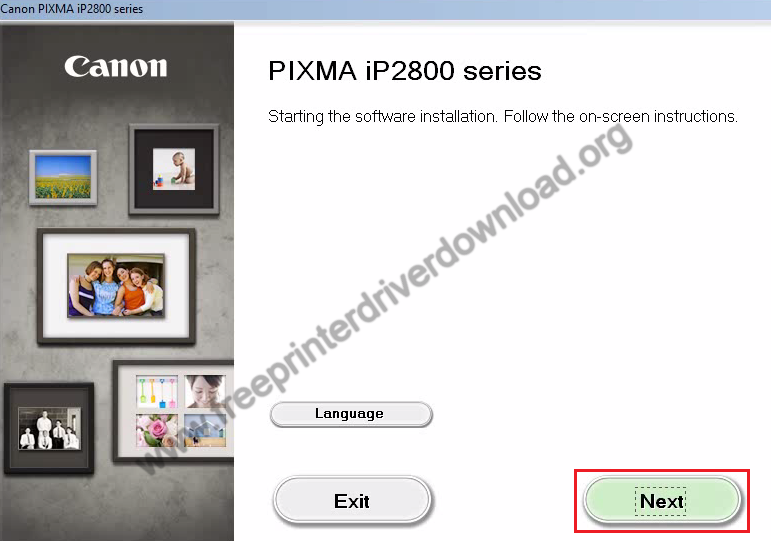
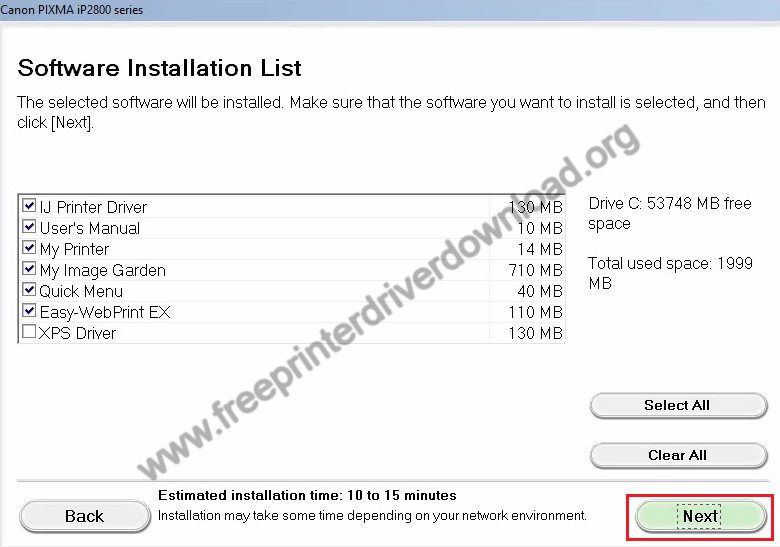
- Select your place of residence, choose the software and driver you want to install, then click ‘Next’.


Step 4: Connect the Scanner
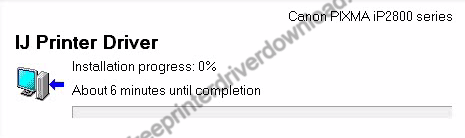
- Wait for the setup program to download, then install your select drivers and software on your computer.
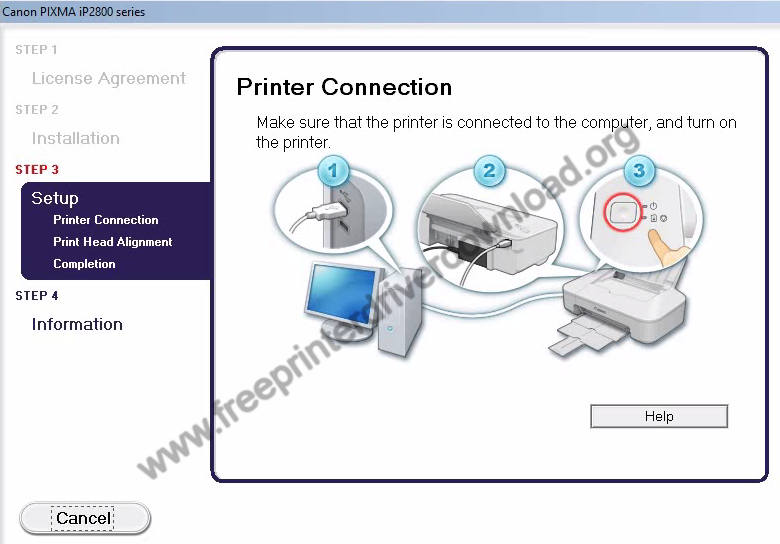
- Start your printer and connect it with the USB port of your computer, wait for the setup program to detect your printer, then follow the prompts to complete the driver installation.


More information about installation:
- How to install the printer driver with its installer
- How to install the printer driver manually using its basic driver
That’s it, installation of the Canon PIXMA iP2840 printer has completed successfully.
More details about the drivers
Hardware Name: PIXMA iP2840
Hardware ID: USBVID_04A9&PID_177A
Connection Type: USB Connection
Installer Type: Setup File (with Installer)
Driver Compatibility
This printer supports Windows XP or later OS versions, but doesn’t support Windows Server operating systems. This printer is compatible with the Mac 10.5 or later OS versions, and Linux/Ubuntu operating systems.
Driver Update
Updating your printer driver with its latest version is a very good habit. It ensures that your printer will keep delivering its optimal performance and the compatibility of your printer with your OS version remains efficient.
Supported Operating Systems
Windows XP, Vista, 7, 8, 8.1, 10, 11 (32, 64-bit)
Mac OS 10.5 and higher
Linux