

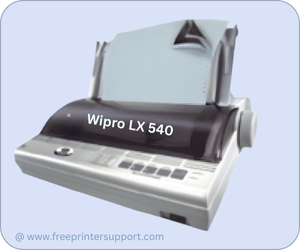
Wipro LX 540 is a 9-pin dot-matrix printer (80 columns). This printer can print 1 Original and 3 carbon copies all together. This printer has only one port: the parallel port (Serial Port). To install this printer on a computer, you will require its latest version driver.
I have given the driver download link in the download section below, you can download the drivers from there. After downloading, you will have to install the printer properly. To make the installation process easy, I have given a step-by-step installation guide which will help you to install the printer properly on a computer, so please follow the following steps.
Download WIPRO LX 540 Printer Driver
In order to download the latest version driver, first know the operating system version of your computer and then click on the below given download link accordingly. This printer supports: Windows 11, 10, 8, 8.1, 7, Vista, XP (32bit / 64bit), Server 2000 to 2025, Linux, Ubuntu, Mac OS X 10.x, 11.x, 12.x, 13.x, 14.x and macOS 15 Sequoia, 26.x operating systems.
Driver for WIPRO LX 540 Pritner
Type: Basic driver Operating System: Windows 11, 10, 8, 8.1, 7, Vista, XP (32bit / 64bit), Server 2000 to 2025 File Size: 12.4 MB Version: 1.2 Download DriverOR
You may download the same drivers directly from Wipro’s official website.
How to Install WIPRO LX 540 Printer Driver
In order to install this printer on your computer, you just need to follow the following step-by-step instructions carefully.
Step 1: Download the driver
Step 2: Unzip the driver file. It will unzip the file at the same location.
Step 3: Open up the extracted folder and there you will get wipro.inf file. You will require this file while installing it manually.
Step 4: Let’s start installing it manually. Here’s the a video tutorial on how to install it manually. Follow the article’s steps carefully.
So, this is how you can install this WIPRO LX 540 printer on your computer by following the same way. I have installed this printer on my Windows 10 computer, but you can follow the same steps for Windows 11, 8, 8.1, 7 as well.
Specifications:
This is a 9-pin dot matrix printer with 80 columns. The print speed of this printer is approx: 200 characters per second. The input buffer size is 21 KB. This can continue to fade paper and cut-sheets. It uses a Ribbon cartridge which you will have to replace over time.
This printer is known for its multiple copies feasibility. If you need multiple copies while printing like invoices (Customer copy or seller copy) then this printer can fulfill all your needs. It uses a 9-pin print-head which makes it more durable.
Usually this printer is used in banks. The size of the printer is very compact with very less maintenance too. It can be installed on Windows 11, 10, 8, 8.1, 7 PCs. You can download the drivers from there. Hope you like the driver download and installation process.






