Printer Driver Software DownloadPrinter Driver Software Download
  • Home
  • Printer Drivers
    • Brother
    • Canon
    • Dell Printer Drivers
    • Lexmark
    • Samsung
    • Epson
    • Request for Printer Driver & Software
  • Tutorials
  • Printer Troubleshooting
  • Disclaimer
  • Contact us
  • Donate
Font ResizerAa
Printer Driver Software DownloadPrinter Driver Software Download
Font ResizerAa
Search
Follow US
Home > Printer Drivers > E-POS TEP-220MC Driver Download (Thermal Printer)
Printer Drivers

E-POS TEP-220MC Driver Download (Thermal Printer)

Techstar
Last updated: November 25, 2026 6:58 pm
By Techstar
2 Min Read

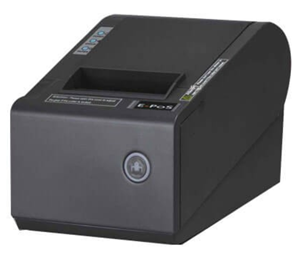
E-POS TEP-220MC is a 80 mm thermal POS receipt printer. This printer can easily connect to the computer through the USB & Parallel port. In order to set up this printer, you need to install its latest version driver on your computer. You can get the latest version driver from the below given download section.

This printer supports Windows 11, 10, 8, 8.1, 7, Vista, XP (32bit/64bit), Server 2000 to 2026 Operating Systems. After you download the correct driver, please read the given PDF file where you will get the step-by-step installation guide. So let’s start the installation process by downloading the drivers first.

Contents
  • Download E-POS TEP-220MC Printer Driver for PC
  • How to Install E-POS TEP-220MC Printer Driver on PC

Download E-POS TEP-220MC Printer Driver for PC

In order to download the driver, click on the download button in front of the operating system listed given below.

Driver for E-POS TEP-220MC Printer

Type: Basic driver Operating System: Windows 11, 10, 8, 8.1, 7 File Size: 4.31 MB Version: 1.3 Download Driver

OR

- Advertisement -

You may download the E-POS TEP-220MC printer driver from E-POS official website.

How to Install E-POS TEP-220MC Printer Driver on PC

To properly install this printer, just follow the following step by step installation guide. Please read the following PDF file for the step-by-step installation guide.

Read the “Install USB Virtual COM Port Driver” PDF file.

Read the “Virtual COM Installation” PDF file.

This is how you can install this TEP‑220MC printer driver on a PC. I have installed this printer on my Windows 10 computer but you can use the same driver and apply the same how-to install steps on your Windows 11, 8, 8.1, 7. In this article I have given TEP‑220MC driver download link and also explained how to install it on a PC.


ByTechstar
My name is Ashok. I enjoy to solve printer driver related problems. I share my research and solutions on this website. If you find my work helpful, please support me by subscribing to my YouTube channel .
Leave a Comment

Leave a Reply Cancel reply

Your email address will not be published. Required fields are marked *

Donate

Useful Links

How to find my printer model number?
How to check my Windows OS version?
Is my Windows 32bit or 64bit?
Printer Diagnostic & Repair Tools
Printer Driver Request

Tech News

1) Apple has just released macOS 15: Sequoia (Glow) on September 18, 2024. The latest drivers are already updated on their download page, please check the download page to download the drivers for maOS 15.2. Read More. January 07, 2025

2) Finally, Microsoft released Windows 11 (24H2) on December 2024. The drivers on this website are being updated according to the latest version; this will be done shortly. You can start downloading the driver from its download page. January 06, 2025

Printer Driver Installation Tips

  • - Always run the printer setup from the CD that came with the printer or downloaded from the official website in order to avoid potential errors and incompatibility issues.
  • - Never plug the printer USB cable to computer during the installation process unless prompted by the installer.
  • - Use only the USB cable that came with the printer
  • - Remove all other previous versions of printer drivers to avoid driver conflicts.
  • - Carefully install the printer cartridges first and then proceed with adding paper to the tray.
  • - Always restart your computer for the driver installation process to be fully completed.

Disclaimer

We are an independent website and is not associated with any brand unless specified. All brand names, trademarks, images used on this website are for reference only, and they belongs to their respective owners. We disclaim any ownership, rights of such third-party products or copyright material unless otherwise specified. We also do not provide any kind of paid support. If you have any question feel free to contact us. Read our full disclaimer.


Donate
Donate

You Might Also Like

Pantum M6512NW printer
Printer Drivers

Download Pantum M6512NW Drivers for Windows / Linux / Mac (Easy Way)

September 15, 2024
Konica Minolta Bizhub C450i Driver
Printer Drivers

Konica Minolta Bizhub C450i Driver Download (Free and Easy Download)

June 22, 2024

Develop ineo 161 Printer Driver Download (Effortless Direct Download)

June 23, 2024

Canon PIXMA MP460 Driver Download

June 22, 2024
All rights reserved. Free Printer Driver Download (freeprinterdriverdownload.org)
  • Home
  • About us
  • Privacy Policy
  • Contact us
  • Disclaimer

Ask Question

Ask a question about your printer problem and we'll be happy to answer your query within 24 hours. It's completely FREE.
If this form is not working properly then please report it here.

Welcome Back!

Sign in to your account

Username or Email Address
Password

Lost your password?