Printer Driver Software DownloadPrinter Driver Software Download
  • Home
  • Printer Drivers
    • Brother
    • Canon
    • Dell Printer Drivers
    • Lexmark
    • Samsung
    • Epson
    • Request for Printer Driver & Software
  • Tutorials
  • Printer Troubleshooting
  • Disclaimer
  • Contact us
  • Donate
Font ResizerAa
Printer Driver Software DownloadPrinter Driver Software Download
Font ResizerAa
Search
Follow US
Home > Lexmark > Lexmark T632 Driver Download (MultiFinction Printer)
Lexmark

Lexmark T632 Driver Download (MultiFinction Printer)

Techstar
Last updated: December 16, 2021 6:04 am
By Techstar
5 Min Read

Lexmark T632 Driver Download Guide

for all Windows OS, Linux and apple’s MacOS.
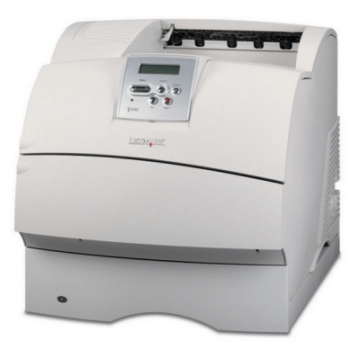
Lexmark T632 printer

Contents
  • Lexmark T632 Driver Download Guide
  • How to download Lexmark T632 driver
  • Driver Download List
  • Lexmark T632 driver compatibility
  • Lexmark T632 supported operating systems
  • Lexmark T632 installation
  • Lexmark T632 uninstallation
  • Lexmark T632 features
  • Lexmark T632 cartridge details

The loss of Lexmark T632 software disc can be a big problem for the users of this printer. However, for all such users a good alternative is Lexmark T632 driver package. In this page, we are providing Lexmark T632 driver download links of Windows Vista, XP, 7, 2000, 8, 10, 8.1, Server 2003, Server 2008, Server 2012, Server 2016 for 32 & 64-bit versions, Mac OS X and various Linux operating systems. Apart from download links we are also giving comprehensive description of the installation process for these drivers.

How to download Lexmark T632 driver

You can easily download drivers from this page in few clicks. Determine the OS where you want to install this printer, and then, download the Lexmark T632 printer driver associated with your OS from our list. If you still have any queries regarding the driver download procedure, then please contact us.

- Advertisement -

Driver Download List

Printer Model NumberOperating System
FIle TypeFile SizeDownload Link
Lexmark T632Windows XP 32bit
Windows Server 2000
Windows Server 2003 32bit / 64bit
Driver & Software Combo2.41 MBDownload Drivers
Lexmark T632Windows Vista 32 / 64bit
Windows 7 32 / 64bit
Windows 8 32 / 64bit
Windows 8.1 32 / 64bit
Windows 10 32 / 64bit
Server 2008 32 / 64bit
Server 2012 32 / 64bit
Server 2016 32 / 64bit
Driver & Software Combo126.25 MBDownload
Lexmark T632For all WindowsIP Setup Utility11.73 MBDownload (IP Setup Utility)
Lexmark T632LinuxDriver & Software Combo40.36 MBDownload
Lexmark T632Apple Macintosh OS X 10.0
Apple Macintosh OS X 10.1
Driver only905 KBDownload
Lexmark T632Apple Macintosh OS X 10.2Driver only905 KBDownload
Lexmark T632Apple Macintosh OS X 10.3Driver only905 KBDownload
Lexmark T632Apple Macintosh OS X 10.4Driver only
Lexmark T632Apple Macintosh OS X 10.5Driver only466 KBDownload
Lexmark T632Apple Macintosh OS X 10.6, 10.7, 10.8, 10.9, 10.10, 10.11, 10.12, 10.13Driver only9.02 MBDownload
Download drivers directly from Lexmark T632 official website.

Lexmark T632 driver compatibility

Keep in mind to install only Lexmark;s own drivers if you want to avoid incompatible drivers. However, you don’t have to worry about this with the drivers provided on this page as all our Lexmark T632 driver download links are of official Lexmark website.

Lexmark T632 supported operating systems

Windows XP, Windows Vista, Windows 2000, Windows 7, Windows 8, Windows 8.1, Windows 10, Windows Server 2003, Windows Server 2008, Windows Server 2012, Windows Server 2016 32bit or 64bit OS, Mac OS X, Linux

Lexmark T632 installation

Never underestimate the importance of printer driver installation procedure as it could impact the performance of your printer. This is the reason why we have described the right way of installing a printer driver so that you can avoid common driver installation mistakes.

Lexmark T632 uninstallation

Resolving the conflicts between multiple driver files can be a tedious procedure. However, you can prevent such a situation by uninstalling all the unnecessary or old drivers from your computer before starting the installation of your new printer driver.

Lexmark T632 features

  1. Print: Yes
  2. Scan: No
  3. Copy: No
  4. Printing technology: Laser
  5. Scan type: None
  6. Wireless (Wi-fi): No
  7. Network (LAN Port): Optional
  8. Printing preferences: Monochrome
  9. Paper Size: A4, A5, Executive, Legal, Letter
  10. Paper Capacity: 600 pages, maximum 4,100 pages
  11. Duplex printing: Yes
  12. Card Slot: No
  13. Cartridge Model No: 12A7365, 12A7362, 12A7360
  14. Display Screen: Yes

Lexmark T632 cartridge details

This Lexmark 632 laser printer uses one Black cartridge. The standard Black (12A7360) catridge, high yield Black (12A7362), and extra high yield Black (12A7365) cartridges can print up to 5,000, 21,000 and 32,000 pages respectively.


ByTechstar
My name is Ashok. I enjoy to solve printer driver related problems. I share my research and solutions on this website. If you find my work helpful, please support me by subscribing to my YouTube channel .
Leave a Comment

Leave a Reply Cancel reply

Your email address will not be published. Required fields are marked *

Donate

Useful Links

How to find my printer model number?
How to check my Windows OS version?
Is my Windows 32bit or 64bit?
Printer Diagnostic & Repair Tools
Printer Driver Request

Tech News

1) Apple has just released macOS 15: Sequoia (Glow) on September 18, 2024. The latest drivers are already updated on their download page, please check the download page to download the drivers for maOS 15.2. Read More. January 07, 2025

2) Finally, Microsoft released Windows 11 (24H2) on December 2024. The drivers on this website are being updated according to the latest version; this will be done shortly. You can start downloading the driver from its download page. January 06, 2025

Printer Driver Installation Tips

  • - Always run the printer setup from the CD that came with the printer or downloaded from the official website in order to avoid potential errors and incompatibility issues.
  • - Never plug the printer USB cable to computer during the installation process unless prompted by the installer.
  • - Use only the USB cable that came with the printer
  • - Remove all other previous versions of printer drivers to avoid driver conflicts.
  • - Carefully install the printer cartridges first and then proceed with adding paper to the tray.
  • - Always restart your computer for the driver installation process to be fully completed.

Disclaimer

We are an independent website and is not associated with any brand unless specified. All brand names, trademarks, images used on this website are for reference only, and they belongs to their respective owners. We disclaim any ownership, rights of such third-party products or copyright material unless otherwise specified. We also do not provide any kind of paid support. If you have any question feel free to contact us. Read our full disclaimer.


Donate
Donate

You Might Also Like

Lexmark-E260d-printer-pics
Lexmark

(Download) Lexmark E260 / E260d / E260dn Driver Download

April 7, 2023
Lexmark cx921de
Lexmark

Lexmark CX921DE Driver Download (Photocopy Machine)

May 25, 2021
Lexmark x6650 Driver
Lexmark

Lexmark x6650 Driver Download (Wireless Printer)

March 21, 2021
Although you can get the Canon ImageClass MF8210c / MF8210cn all-in-one printer drivers in their printer CD, but sometimes they are outdated. Therefore, you should use the latest version of the Canon printer drivers released for these printer models. In this guide, I have provided the Canon ImageClass MF8210c / MF8210cn driver download links of the latest Canon printer drivers for the Windows, Mac and Linux operating systems. Read the how to install section to find the right installation method for these Canon printer drivers. Steps to Download Canon MF8210c/cn Driver Step 1: Select the operating system where you want to install this printer. Step 2: Click on its download button to download your Canon ImageClass MF8210c / MF8210cn driver setup file. Canon MF8210c / MF8210cn Driver for Windows Full feature driver for Windows 11, 10, 8, 8.1, 7, Vista, XP, Server 2000, 2003, 200,8 XP (32bit) – Download (123 MB) Driver for Mac Driver for Mac OS 11.x, 12.x, 13.x, 14.x – Printer Driver / Scanner Driver Driver for Mac OS 10.13 to 10.15 – Printer Driver / Scanner Driver Driver for Mac OS 10.12 – Printer Driver / Scanner Driver Driver for Mac OS 10.11 – Printer Driver / Scanner Driver Driver for Mac OS 10.10 – Printer Driver / Scanner Driver Driver for Mac OS 10.9 – Printer Driver / Scanner Driver Driver for Mac OS 10.8 – Printer Driver / Scanner Driver Driver for Mac OS 10.7 – Printer Driver / Scanner Driver Driver for Mac OS 10.6 – Printer Driver / Scanner Driver Driver for Mac OS 10.5 – Printer Driver / Scanner Driver Driver for Linux/Ubuntu Canon MF8210c / MF8210cn driver for Linux and Ubuntu – Download (63.5 MB) OR Download the driver directly from the Canon ImageClass MF8210c / MF8210cn official website. How to Install Canon MF8210c / MF8210cn Driver In this section, I have provided the detailed installation guide for the full feature driver and basic driver (inf driver), which you must read before starting the installation of your Canon ImageClass MF8210c / MF8210cn printer drivers. 1) Using its full feature driver Follow the installation steps given below to properly install your full feature Canon ImageClass MF8210c / MF8210cn driver on all the versions of the Windows operating system. Right click the driver package file and choose ‘Run as administrator’ option from the menu. Wait for the files to extract into the specified folder. In the Welcome screen, click on the ‘Next’ button. Accept the license agreement by clicking on the ‘Yes’ button. In the Select the Type of Connection screen, select the ‘USB Connection’ option, then click on the ‘Next’ button. Wait for the setup wizard to copy the necessary files on your computer. If you want, then you can connect your Canon printer with your computer via USB cable. Finally, click on the ‘Exit’ button. Click on the ‘Accept’ button to agree with the license agreement. Click on the ‘Accept’ button to accept the survey program. Close the setup wizard by clicking on the ‘OK’ button. That’s it, installation of the Canon ImageClass MF8210c / MF8210cn driver package has been completed successfully. 2) Using its basic driver Read this installation guide for the proper installation of the Canon ImageClass MF8210c / MF8210cn basic driver on a Windows computer. Read this article: How to install a printer driver manually using a basic driver (.INF driver). Features The Canon ImageClass MF8210c / MF8210cn all-in-one printers are color laser printers designed for office use, which can be connected with your computer by using its USB and Ethernet connectivity options. Toner Cartridge Details: This laser printer uses one Black (331 BK), one Cyan (331 C), one Magenta (331 M) and one Yellow (331 Y) toner cartridge for printing, which can print up to 1600 pages, 1400 pages, 1400 pages and 1400 pages respectively.
Lexmark

Lexmark MS610dn Driver Download (Easy Download)

May 14, 2024
All rights reserved. Free Printer Driver Download (freeprinterdriverdownload.org)
  • Home
  • About us
  • Privacy Policy
  • Contact us
  • Disclaimer

Ask Question

Ask a question about your printer problem and we'll be happy to answer your query within 24 hours. It's completely FREE.
If this form is not working properly then please report it here.

Welcome Back!

Sign in to your account

Username or Email Address
Password

Lost your password?